DDEV v1.25.5: PHP Security Fixes, Rebuilt TUI, Your Own SSH Agent, QR Codes
DDEV v1.25.5 is out sooner than we planned, because PHP published fixes for two critical vulnerabilities and we wanted ddev-webserver to ship them. It also brings 131 PRs from the DDEV community that were already waiting for the next release: your suggestions, bug reports, code, and financial support made them possible.
Table of Contents
- PHP Fixes for CVE-2026-109618 and CVE-2026-109619
- Initial PHP 8.6 Support
- A Rebuilt
ddev tui - Use the SSH Agent You Already Run
- Restart Only the Services You Name
- QR Codes for
ddev shareandddev launch - zstd for Database and File Imports and Exports
- Global Hooks and
global_config.*.yaml - Changes That Might Affect You
- Regressions, Fixed
- Everything Else
PHP Fixes for CVE-2026-109618 and CVE-2026-109619
ddev-webserver now ships PHP 8.5.XX, 8.4.XX, 8.3.XX, and 8.2.XX, which fix CVE-2026-109618 and CVE-2026-109619 (“PHP2Shell”); see the PHP announcement. PHP 8.1 and older are past end of life and get no fix from PHP, but deb.sury.org, where ddev-webserver gets its PHP packages, patches every PHP version it ships, so PHP 5.6 through 8.1 in DDEV are fixed too.
For most DDEV users these vulnerabilities don’t matter locally, because a DDEV project can only be reached from your own computer. They do when you expose a project with ddev share or use DDEV for casual hosting. After upgrading DDEV, run ddev restart and check the version with ddev php -v.
Update PHP where your sites are hosted
The servers your sites run on in production are the ones exposed to the internet, so make sure your hosting provider or your own servers get the PHP update.
If You Can’t Upgrade DDEV Yet
Existing projects can get the fixed packages without a new DDEV version:
-
PHP 5.6 through 8.1 aren’t part of the
ddev-webserverimage. DDEV installs them from deb.sury.org when it builds the project’s web image and reuses that image afterwards, so runddev restart --no-cacheonce deb.sury.org has published the fixed packages. They come for AMD64 first and ARM64 later, so a project you upgrade to v1.25.5 before then needs the same command later. -
PHP 8.2 through 8.5 are part of the image. To update them before you upgrade to v1.25.5, add
.ddev/web-build/Dockerfile.updateto the project and runddev restart:RUN (apt-get update || true) && apt-get upgrade -yDelete the file once you’ve upgraded to v1.25.5. If you added it before the fixed packages were out, run
ddev restart --no-cacheto apply them, because Docker reuses the layer it built earlier.
We tried both on v1.25.4: Dockerfile.update took a project from the image’s PHP 8.3.33 to 8.3.35, the newest build on deb.sury.org at the time, and ddev restart --no-cache reinstalled PHP 7.4 from deb.sury.org.
There’s a second change in the same area. With nginx-fpm, PHP files in CMS upload directories no longer run. Drupal, Backdrop, Magento 1 and 2, Maho, and Silverstripe protect those directories only with an .htaccess file, which nginx ignores, so DDEV’s nginx templates now deny them, as the WordPress template already did for uploads.
Initial PHP 8.6 Support
PHP 8.6 isn’t released yet, but you can try it:
ddev config --php-version=8.6deb.sury.org doesn’t package every extension for 8.6 yet, and enabling Xdebug, XHProf, or Blackfire on it gives a clear error instead of a broken container.
A Rebuilt ddev tui


Running ddev with no arguments opens the TUI, and it has a new layout that fits any window size and shows the project list before Docker responds. Here are 15 projects, 10 of them running, in v1.25.4 (top) and v1.25.5 (bottom). The list now says how many projects are running, and the header shows the health of the SSH agent next to the router:
The project view adds the database address from your host, from the project, and from other projects; snapshots; the published ports of every service; and add-ons that have an update available, like ddev-redis here. When it doesn’t fit the window, it scrolls:
Paths and URLs are clickable links, and o, v, and p open the project in your file manager, VS Code, or PhpStorm. D deletes a project, thanks to @MitraKumar. ? lists every key, and the help now fits the window:

Two keys changed: R restarts and r refreshes, swapped from before, and only enter opens the project view.
Use the SSH Agent You Already Run
If your SSH keys live in an agent instead of ~/.ssh, such as the macOS agent, 1Password, Secretive, a YubiKey through gpg-agent, or an agent forwarded with ssh -A, DDEV’s containers can now use it directly:
ddev config global --ssh-agent-upstream=host
ddev auth ssh      # lists the keys your containers can use
After that, every project uses your agent, and there are no key files to add with ddev auth ssh. DDEV also follows a symlinked agent socket, such as VS Code Remote’s /tmp/vscode-ssh-auth-sock-*. Which agent your containers get on macOS depends on your Docker provider, and Rancher Desktop and Podman aren’t supported; Using an Existing SSH Agent has the table.
Restart Only the Services You Name
ddev restart -s recreates the services you name and leaves the rest of the project running:
$ ddev restart -s redis
Restarting redis in project docs-portal...
Building images for [redis].... built in 1.0s
Container Recreated: ddev-docs-portal-redis
Container Started: ddev-docs-portal-redis
Waiting for containers to become ready: [redis]... ready in 0.5s
ddev-router already running, pushing new config... ready in 0.9s
Restarted redis in docs-portal
That took under four seconds here. It takes a comma-separated list, as in ddev restart -s solr,redis, and ddev utility rebuild -s now accepts several services too. ddev restart --profiles=x replaces ddev restart && ddev start --profiles=x.
Interrupting DDEV is also safer now. Ctrl-C, SIGTERM, or closing the terminal no longer leaves temporary containers like start-chown-* holding project volumes, and interrupting ddev import-db, ddev export-db, or ddev snapshot leaves no partial dump or snapshot behind.
QR Codes for ddev share and ddev launch
ddev share prints a QR code for the tunnel URL, so you can open the shared site on your phone without typing it. ddev launch --qr prints the project URL with its QR code:
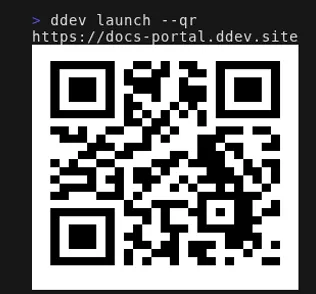
This replaces the ddev-qr add-on, which ddev start now removes. Thanks to @tyler36, who started all of this in ddev-qr.
zstd for Database and File Imports and Exports
ddev import-db and ddev import-files accept zstd files, and ddev export-db picks the format from the file extension:
ddev export-db -f db.sql.zst
ddev import-db -f db.sql.zst
--compression chooses gzip, bzip2, xz, zstd, or none explicitly. One consequence: ddev export-db --file=x.sql now writes plain SQL. Before, it wrote gzip data to a file named .sql.
Global Hooks and global_config.*.yaml
Global hooks in ~/.ddev/global_config.yaml run for every project, before the project’s own hooks:
hooks:
  post-start:
    - exec-host: "echo a global hook ran"
A project can opt out with skip_global_hooks: true. global_config.*.yaml files in ~/.ddev are merged over global_config.yaml, the way config.*.yaml files are in a project, so a team can hand out a global_config.team.yaml without touching the file DDEV rewrites. Check ~/.ddev for leftovers like global_config.old.yaml, because those are merged now too.
New pre-delete and post-delete hooks clean up files a project created, without doing it on every ddev stop, thanks to @wazum.
Changes That Might Affect You
- WP-CLI, Drush 8, the Backdrop Drush extension, magerun, magerun2, and Symfony CLI are installed only in the project types that use them. To use one elsewhere, add it in a
web-buildDockerfile; see Project-Specific Utilities. - DDEV assigns host ports itself. Unconfigured db, web, and Mailpit host ports move to 20000-29999 the next time their containers are created, and the router’s fallback ports move to 30000-32000. Ports you set with
host_*_portdon’t change. - A custom service or add-on whose
container_nameisn’tddev-<project>-<service>is renamed, with a warning. Reach it by its service name instead. --profilesreplacesCOMPOSE_PROFILES, as in Docker Compose, so on a stopped projectddev start --profiles=xno longer starts the profiles inCOMPOSE_PROFILESas well.DDEV_DEBUGno longer shows per-layer image download progress or routine start messages;DDEV_VERBOSEdoes.
Regressions, Fixed
- Directory listing works again. The 403 explanation page in v1.25.4 had disabled it for every project.
ddev composer create-projectagain passes flags like--no-devand-vvvto the Composer scripts it runs after creating the project, which v1.25.3 stopped doing.- Magento, Magento 2, and Maho show their own 404 pages again, instead of DDEV’s explanation page, thanks to @gunnie-agency.
Everything Else
ddev list, ddev describe, and ddev tui respond faster, and the more projects you have running, the bigger the difference. Running ddev start or ddev poweroff in several terminals at once no longer breaks the shared router, and nginx passes PATH_INFO to PHP, so URLs like /index.php/foo/bar work as they do with Apache. See the release notes for the rest.
From all of us, thanks for using, promoting, contributing, and supporting DDEV!
If you have questions, reach out in any of the support channels.
If you wonder how all this could be done, it’s because of generous sponsors who let two of us work on this every day. If you and your team aren’t already financially supporting DDEV, consider joining our sponsors.
Follow our blog, Bluesky, LinkedIn, Mastodon, and join us on Discord. Sign up for the monthly newsletter.
This article was edited and refined with assistance from Claude Code.